How to Customize Sitecore's Sitemap Module





Jun 25, 2012


Now that you know how to build Sitecore navigation using rendering, I’ll show you how to customize Sitecore’s Sitemap module.
To build the sitemap page, I did some research and was able to find a Sitecore module published in the Sitecore Developer Network (SDN) that helps developers create the sitemap page.
This module is great; however, if your site has a different structure than the default Sitecore sitemap, you may have to make some modifications.
Since this module is made using renderings, it is easy to modify:
- First we set the template IDs of nodes that we want to display on the sitemap. This template IDs should be from the page nodes. This is done on the XSL parameter "templates"

- You may also need to change the template name of the home page template. This is for selecting the home page node and using that node as the starting point of the sitemap. This is done in the "home" variable. In this case, the template name is "home page".

- Next, where the code starts iterating to get all items for the sitemap on the XSL main template, I have added a condition. This condition meets a property called "includeinsitemap" which is a checkbox property on the base page template. This base template is inherited by all page templates.
Let’s take a look at the code:

We’ll iterate through all nodes that have checked the IncludeInSitemap property. This same change needs to be done on the XSL sitemap template.
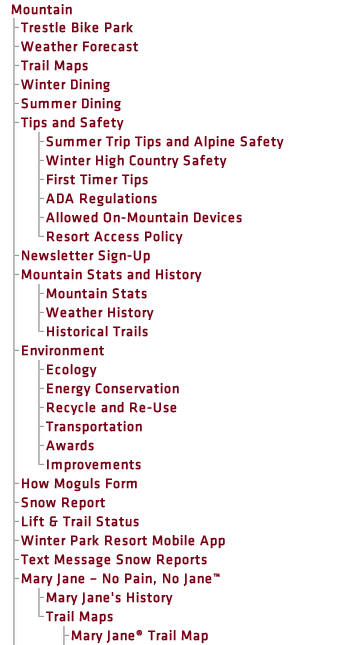
The final result of this is a HTML code with the info you wanted to show:
-
BLOG

 Ramiro Batallas
How Spaces and Agents Change Content Operations in SitecoreAI
-
BLOG

 Patrick Wirz
Join Oshyn in Orlando for Sitecore Symposium 2026
-
BLOG

 Victor Bauz
How Your Contentstack Model Shapes Your Accessibility Readiness
-
BLOG

 Trotsky Gonzalez
AEO Over SEO
Why AI Search Rewards Answers, Not Rankings
This site is protected by reCAPTCHA, and our Privacy Policy applies.