

Oshyn Home Page
  • expertise
    • Overview
    • Contact Us |
    • Latest work: www.miramax.com
  • solutions
    • Overview
    • Content Management
      • Common Issues
      • Choosing a CMS
      • Training
      • Drupal Development
      • Jahia Integration
      • Sitecore Consulting
      • Open Text Web Solutions RedDot CMS
      • EPiServer CMS Consulting
    • E-commerce
    • SOA
    • Portals & Collaboration
    • Web Strategy
    • Mobile Platforms
    • Social Media
    • Contact Us |
    • Latest work: www.miramax.com
  • work
    • Overview
    • Client Quotes
    • Contact Us |
    • Latest work: www.websense.com
  • resources
    • Overview
    • News & Events
    • Newsletters
    • Blog
    • White Papers
    • Success Stories
    • Press Kit
    • Contact Us |
    • Latest work: www.disneydvd.com
  • partners
    • Overview
    • Agency Partner Program
    • Technology Partners
    • Contact Us |
    • Latest work: www.nea.org
  • company
    • Overview
    • Contact
    • Careers
    • Leadership Team
    • News & Events
    • Social Responsibility
    • Contact Us |
    • Latest work: www.icon4x4.com
Selenium RC for Automated Testing
  • Tweet
Monday, March 15, 2010  /   Belen Padilla Belen Padilla
close

Belen Padilla


I started my career developing web applications and later had the opportunity to focus on software testing. I enjoy delivering applications that have been deeply tested to meet client requirements and user expectations. When testing, I always think as an end user and like to create real-life scenarios to find the most bugs possible. I have worked in Software industry in many countries including: Ecuador, The United States, Denmark and Czech Republic. I really love travelling and working in international teams. I joined Oshyn in 2009 where I mainly focus on software testing; however, I have also worked in other areas including project management, resources management, and business analysis.

Selenium RC for Automated Testing


In my previous post, Selenium IDE for Automated Testing, I showed you how to use Selenium IDE, run a simple test case “GoogleSignUpErrors” and exported it as a Java file. This post is a guide to install Selenium Remote Control and run “GoogleSignUpErrors” as a Java program.

Selenium Remote Control

Selenium RC is a test tool that allows writing tests in any programming language. This tool is useful in test cases that need logic not supported by Selenium IDE. For example you might need to capture screenshots depending on the results of a certain action; in this case you can export your test case to your preferred language and modify the code to implement the desired behavior.

RC Components

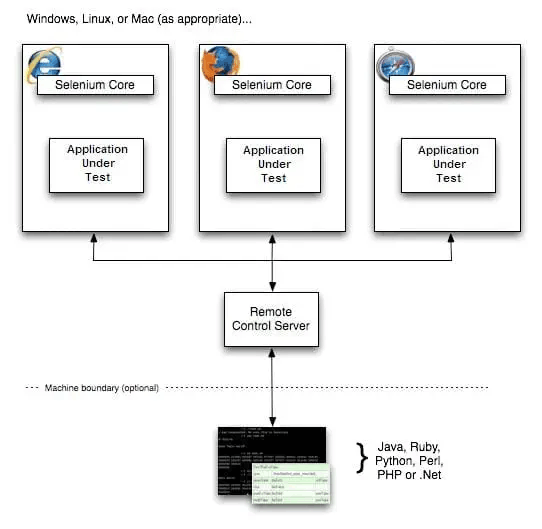
Selenium RC works with these 2 components: Remote Control Server and Client Libraries.
(Selenium RC)

Remote Control Server receives the Selenium commands from the test program using HTTP GET/POST requests. Each command is passed to the browser using Selenium-Core JavaScript commands.  “Selenium-Core is a JavaScript program, actually a set of JavaScript functions which interprets and executes Selenese commands using the browser’s built-in JavaScript interpreter.” (Selenium RC)

Client Libraries are the Interface between each programming language and Selenium-RC server; they provide a programming function for each Selenese command. Client libraries pass the Selenese commands to the Selenium Server, then receive the result of the command and pass it to the test program. You can store the result of the command as a variable and do a specific action in your program, for example take a screenshot if the result is interpreted as “failed”.

Selenium-RC Installation

I am assuming Java is installed and PATH environmental variable is configured.

1.    Download Selenium RC Zip file from: http://seleniumhq.org/download/

2.    Unzip the file. There will be a folder per supported language and selenium-server folder which contains the selenium-server.jar which is the Selenium-RC server

As I am going to use a Java file, I installed JUnit to be used as test engine. To install JUnit, simply:

1.    Download latest version of JUnit from: http://sourceforge.net/projects/junit/files/

2.    Unzip Junit.zip file

After installing JUnit, you need to modify the CLASSPATH environmental variable:

Add JUnit to your %CLASSPATH% environmental variable. For example, in Windows:

      set CLASSPATH=%CLASSPATH%; C:\junit4.8.1\junit-4.8.1.jar;C:\junit4.8.1

To test JUnit installation, run this in the command line:

java org.junit.runner.JUnitCore org.junit.tests.AllTests
All tests should pass with OK message.(JUnit)

Starting Selenium Sever

1.    Go to the command-line console

2.    Run the command: java -jar [selenium server path ]\selenium-server.jar

Selenium-server will start running

Run Java Test case: GoogleSignUpError.java

First you will need to fix the automatically generated java file:

  • Remove : package com.example.tests;
  • Add: import junit.framework.*;
  • Add these code:

public static Test suite() {

                return new TestSuite(GoogleSignUpErrors.class);

}

public static void main(String args[]) {

                junit.textui.TestRunner.run(suite());

}

(Simple Thoughts - Java and Web Blog)

The fixed Java code:

//package com.example.tests;

import com.thoughtworks.selenium.*;

// This is the driver's import. You'll use this for instantiating

// browser and making it do what you need.

import junit.framework.*;//junit framework

import java.util.regex.Pattern;

// Selenium IDE add the Pattern module because it's sometimes used for

// regex validations. You can remove the module if it's not used in your

// script.

public class GoogleSignUpErrors extends SeleneseTestCase {

                public void setUp() throws Exception {

                                setUp("http://www.google.com/", "*chrome");

                }

                public void testGoogleSignUpErrors() throws Exception {

                                selenium.open("http://www.google.com/ncr");//instantiate and start the browser

                                verifyTrue(selenium.isElementPresent("logo"));

                                selenium.mouseOver("logo");

                                selenium.click("link=Sign in");

                                selenium.waitForPageToLoad("30000");

                                selenium.click("//div[@id='rhs_login_signup_box']/table/tbody/tr/td/a/b");

                                selenium.waitForPageToLoad("30000");

                                verifyTrue(selenium.isTextPresent("Create an Account"));

                                selenium.click("//img[@alt='Google']");

                                selenium.waitForPageToLoad("30000");

                                selenium.click("//div[@id='rhs_login_signup_box']/table/tbody/tr/td/a/b");

                                selenium.waitForPageToLoad("30000");

                                selenium.click("submitbutton");

                                selenium.waitForPageToLoad("30000");

                                verifyTrue(selenium.isTextPresent("Required field cannot be left blank"));

                                verifyTrue(selenium.isTextPresent("Required field cannot be left blank"));

                                verifyTrue(selenium.isTextPresent("Required field cannot be left blank"));

                                verifyTrue(selenium.isTextPresent("Required field cannot be left blank"));

                                verifyTrue(selenium.isTextPresent("The characters you entered didn't match the word verification. Please try again."));

                }


                public static Test suite() {

                                return new TestSuite(GoogleSignUpErrors.class);

                }

                public static void main(String args[]) {

                                junit.textui.TestRunner.run(suite());

                }

}

To run the java program:

1.    Open a new command prompt

2.    cd [GoogleSignUpErrors path location]

3.    Run these commands to compile and run the test case:

javac  GoogleSignUpErrors.java

java  GoogleSignUp

Selenium-RC Server will receive the commands from the java program and start executing them in Firefox.


References:

Selenium Project: http://seleniumhq.org/ 

JUnit: http://junit.sourceforge.net/doc/faq/faq.htm

Simple Thoughts - Java and Web Blog:

  • http://blog.taragana.com/index.php/archive/9-important-tips-for-selenium-remote-control-java-client-test-tool/
  • http://blog.taragana.com/index.php/archive/5-minute-guide-to-Selenium IDE-and-selenium-rc-test-tools/
  • Share
  • Facebook    0
  • Twitter    0
Trackback Link
http://www.oshyn.com/BlogRetrieve.aspx?BlogID=2583&PostID=127399&A=Trackback
Trackbacks
Post has no trackbacks.

blog comments powered by Disqus

Pages: Previous Next

TwitterFacebookLinkedIn

Blog Authors

Christian Burne Christian Burne
question button image


Captcha Image

question button image
Subscribe Subscribe Subscribe Subscribe Subscribe
OTHER CATEGORIES
  • ALL

  • General

  • Web Content Management

  • Sitecore CMS

  • Open Text

  • Jahia

  • Drupal

  • EpiServer

  • SOA

  • Social Media and Mobile

  • Software Development

  • Visit Bloggers Profiles

RELATED POSTS
  • Jira new plugin: Bonfire for Agile Testing
  • Google App Inventor: An Android Mobile App Developer for Everyone
  • Agile Testing and Test Management
  • .Net Source Code Quality Tools – Part 3: Analyzing Code
  • Using WMDRM on your Application – Part 2
  • .Net Source Code Quality Tools – Part 2: Configuring the Build
  • Using WMDRM on your Application – Part 1
  • .Net Source Code Quality Tools – Part 1: Setup
  • ClickOnce Deployment - Creating a Custom Installer
  • Build Automation for Windows Presentation Framework (WPF) and Silverlight Applications

WHITE PAPERS
    ajax rotator

    Web Content Management, Social Media, Content: Three Kings for Your Website Web Content Management, Social Media, Content: Three Kings for Your Website (846 KB)
    Companies pursuing online marketing success, including Social Media, can increase the power of their online presence with right strategy and technology to maximize online visibility and engagement. Download this FREE white paper on the WCM, Social Media, and Content triad.

    Drupal Performance Tuning Drupal Performance Tuning (1213 KB)
    In this Free White Paper Oshyn evaluates Drupal Performance Tuning, sharing the results of testing response time and Requests Per Second (RPS) that a server can hold before the response rate becomes unacceptable. In this paper you will learn about optimizing performance of a website through changes to settings and the server.

    Enterprise Drupal: Social Media, Mobile, and Rich Media in your Website Enterprise Drupal: Social Media, Mobile, and Rich Media in your Website (1015 KB)
    In this free WCM white paper, Oshyn examines advanced Drupal capabilities: Multisite Environment, Access Control and Security, Enhanced User Profiles, Custom Breadcrumbs, Mobile Support, Podcasts, Advanced Multimedia, Locations and Maps, Internationalization and Locale based content, Events and Scheduled Tasks, Rules Actions and E-Commerce Solutions.

    Drupal Multilingual Drupal Multilingual (636 KB)
    There are several multilingual installation methods for Drupal. In this free white paper Oshyn evaluates and recommends several methods of using Drupal Open Source CMS to manage websites in multiple languages.

    Drupal Social Media Drupal Social Media (1297 KB)
    Looking for an Open Source CMS to for “Social Media Optimization” of your website? Download this free white paper, “Drupal and Social Media”, to learn about the extensive Social Media this Open Source CMS offers to create a dynamic and engaging website and online community.

    Drupal Multisite Options Drupal Multisite Options (427 KB)
    There are several multisite installation methods for Drupal. In this free white paper Oshyn evaluates and recommends several methods of using Drupal Open Source CMS to manage multiple sites.

    Open Source CMS: Is It Right for your Organization Open Source CMS: Is It Right for your Organization (496 KB)
    In this free white paper, “Open Source CMS: Is It Right for your Organization?” we share an in-depth look at the pros and cons of using Open Source Content Management Systems (CMS) or Open Source Web Content Management (WCM) platforms. Oshyn helps clients select CMS/WCM solutions based on the specific requirements of each client.

    Affiliate Content Sharing in a CMS/WCM World Affiliate Content Sharing in a CMS/WCM World (273 KB)
    The Content Editors at your company have created GREAT content! Now how do you share it? In this Free white paper learn several methods for using a Content Syndication tool to automatically repurpose content and how Content Sharing can generate business value.

    Sitecore and Social Media - An Interactive Web Content Management Platform Sitecore and Social Media - An Interactive Web Content Management Platform (898 KB)
    Social Media has revolutionized how people interact with business. In this white paper Oshyn’s Lead Sitecore Developer, Prasanth Nittala, discusses key points from the perspectives of marketing and Web development that make Sitecore a compelling choice for engaging in Social Media via your website. This Sitecore white paper draws from Oshyn’s expertise as a certified Sitecore partner, helping organizations understand the distinct capabilities offered by Sitecore CMS.

    The Business Case for Leveraging Open Text Web Solutions Delivery Manager The Business Case for Leveraging Open Text Web Solutions Delivery Manager (451 KB)
    This free white paper explores the evolving needs of small and medium size businesses and explains how the Open Text Web Solutions Delivery Manager (formerly RedDot LiveServer) can help businesses build their brand, reputation, and client base. This white paper examines strategies, key points and tips to leverage the features available in Open Text Web Solutions (RedDot CMS) to achieve an impactful user experience and to maximize visitor engagement through a reliable and powerful implementation.

    Open Text Best Practices: Part One Open Text Best Practices: Part One (763 KB)
    Authored by Oshyn Senior Consultant, Adaeze Okorie, this free CMS white paper draws from Oshyn’s vast experience as an Open Text Certified Partner, in helping organizations define strategies to meet business goals while implementing Open Text Web Solutions (RedDot CMS). Specifically in this free white paper Adaeze Okorie discusses strategies, key points and tips to leverage the features available in Open Text Web Solutions (RedDot CMS) to achieve an effective, reliable and robust implementation.

    Improving the ROI of Business Software: Service Oriented Architecture from a Business Perspective Improving the ROI of Business Software: Service Oriented Architecture from a Business Perspective (398 KB)
    Software selection and technology decision making should no longer be left to the IT department alone. By gaining an understanding of Service-Oriented Architecture, business people outside of the IT department will be better positioned to maximize the ROI of the company's technology platforms. Download this free white paper to learn more.

    Getting Over Social Media Marketing Paralysis for B2B Getting Over Social Media Marketing Paralysis for B2B (2254 KB)
    Many companies are well aware that Social Media has become critically important to engaging audiences and promoting online "presence" while some wonder how to approach their C-level executives and prove that it is not all hype. With so many ways to engage in Social Media, how can they get buy-in and begin execution with so many different venues and tools available? Staying on the sidelines and becoming a latecomer might make it more difficult to create a convincing "social" presence. Put the ove

    Performance Tuning Open Text Web Solutions Management Server and Delivery Server Performance Tuning Open Text Web Solutions Management Server and Delivery Server (235 KB)
    If you've made an investment in Open Text Web Solutions (formerly RedDot) Web Content Management products, you’ve undoubtedly experienced performance issues. While every CMS requires tuning, Open Text Web Solutions - RedDot is especially susceptible to mis-configuration and poor performance as the out-of-the-box installation comes untuned and ready for Development Environments only. In this FREE white paper we share performance tuning expertise as an Open Text Certified Partner that has optimize

    The Business Case for Leveraging Open Text Web Solutions Within Higher Education The Business Case for Leveraging Open Text Web Solutions Within Higher Education (430 KB)
    Academic institutions have a long reputation for being slower to adopt new technologies for their audiences. However, many schools are taking serious steps in improving the online experience they are providing. This white paper explores the unique needs of the higher education market, applying new tools & trends and specifically how the Open Text Web Solutions’ Delivery Manager (formerly known as RedDot LiveServer) can be leveraged to achieve those goals.

    SEO Best Practices within a Content Management System SEO Best Practices within a Content Management System (712 KB)
    In this free white paper, we share Search Engine Optimization (SEO) tips and best practices to follow when implementing a Content Management System (CMS). Certain features and functionality will help your content editors make website changes faster while minimizing the risk of human error. Download this free white paper to learn strategies to improve search engine rankings.

    Best Practices for Sitecore CMS Best Practices for Sitecore CMS (1121 KB)
    Sitecore CMS is an extensive Web Content Management (WCM) platform for the mid-market. It offers reduced IT expenditures, a streamlined content lifecycle, and a return of content control to the subject matter experts. The newest incarnation of Sitecore CMS version 6.0 is a mature product that incorporates standard social media components such as wikis, blogs, RSS syndication and “e-mail a friend” features.

    Optimizing SEO in your CMS (WCM) Optimizing SEO in your CMS (WCM) (3108 KB)
    Oshyn's Christian Burne spoke in depth about SEO in CMS at the Gilbane San Francisco Conference on June 3rd, 2009. Christian discussed the pressues of keyword competition and how the CMS can add tremendous power to climbing Google SERPs and other search engine rankings. The presentation was later part of a featured article on CMSWire. We've made the presentation available in PDF format. Download now to learn more about strategies for using your CMS to optimize SEO.

    The Best CMS for You: Tips on How to Select Your Next CMS The Best CMS for You: Tips on How to Select Your Next CMS (909 KB)
    As websites continue to grow in size, features and functionality, the visitors to these websites are also becoming more demanding and have higher expectations than ever before. Companies who committed valuable time and resources to web strategies just five years ago are finding they must re-evaluate and explore new options as their content, features and online offerings must keep pace with the constant and rapid movement in the digital marketplace. For many of these companies, there is a strong.

    Oshyn Sample Voluntary Product Accessibility Template (VPAT) Oshyn Sample Voluntary Product Accessibility Template (VPAT) (741 KB)
    Section 508 requires that when federal government and agencies procure, develop, and maintain or use electronic and information technology (EIT), they must ensure that it is accessible and in compliance with Section 508 standards developed by the Architectural and Transportation Barriers Compliance Board (Access Board). Oshyn understands these requirements and has delivered reports like these countless times.

    Sitecore CMS Implementation Best Practices Sitecore CMS Implementation Best Practices (481 KB)

    TwitterFacebookLinkedInAlltopFeatured in Alltop
    Oshyn, Inc.17785 Center Court Drive N Cerritos, CA 90703    1.888.483.1770 newbusiness@oshyn.com
    2012 Copyright Oshyn. All rights reserved.
    • View Mobile Version
    • Terms of Use
    • Privacy Policy
    • Contact Us